Wednesday, July 4, 2012

TouchRetouch v3.1


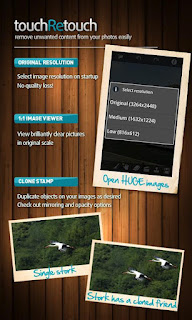
TouchRetouch is an award-winning photo editor that allows you to remove unwanted content or objects from any photo, using just your finger and your phone. Mark the items you want taken out of the snapshot and hit ‘Go’. That’s all there is to it. Photo editing has never been so quick, easy and convenient.
You recently got married on a beautiful Caribbean beach. Everything was so perfect. Luckily, you have a lot of memorable snapshots of the crystalline water and white sand backdrop of the ceremony, you and your new spouse silhouetted in the sunset, your guests under a palm tree, that nude sunbather that somehow got included in a shot taken during the exchanging of vows. Yikes! Before showing your mom those photos, take a minute to remove that accidental guest from an otherwise great picture. Open your TouchRetouch app. Using your finger, select the Brush or Lasso tool to mark what you don’t want in the shot, then hit the ‘Go’ button. Okay, you’re done and it’s now safe to share your picture-perfect memories with everybody.

TouchRetouch isn’t just for exotic or
wedding photo touch-ups, of course. Use this easy yet ingenious application on any photo, newly snapped on your phone or taken from your gallery. Remove those wires that are in the way of an otherwise wonderful view, take banners off of buildings, get rid of people, eliminate spots and other imperfections. All without distorting the final image.

You can even have a little fun with TouchRetouch. Take away the
bicycle from under your brother and it looks like he’s cycling in mid-air. You can make it look like people are flying, jumping or posed oddly, by removing whatever was supporting them.
Do everything mentioned here and more, in mere seconds without any special equipment.

Features:
  1. In-app video tutorials
  2. Unlimited Undo/Redo actions
  3. Smart image background recovery techniques
  4. No distortions in final image
  5. Easy to use interface
  6. 1:1 view
  7. Finger move hint
Download TouchRetouch now and start creating amazing or funny photos. It’s easy, fun and always ready to edit your images in a tap or two - no matter when, no matter where.

Click here and download application, then extract app and instal:
http://www.4shared.com/zip/R8ylXwMv/Touch_Re_touch__Apk_IVA_.html 

Orux Maps v4.8.38


Map viewer/route logger for your outdoor activities.
OruxMaps works in two modes:
✯ online with many different types of maps (Google maps, OpenStreetMap, Microsoft Maps,etc.).
✯ offline with calibrated maps for the application. You can convert your Ozi Explorer maps, or create your own maps, with a desktop tool.

Features:
  1. Map download 
  2. Text to Speech (some locales) 
  3. Wms support - Support to some .rmap maps, Support to vector maps (mapsforge) 
  4. Profiles - Save/restore preferences ,Complete track statistics, with different graphs 
  5. External bluetooth GPS support 
  6. Export your tracks in KML/GPX formats 
  7. Follow your old tracks/routes, with distance alarm. 
  8. Save Waypoints with attached photo-audio-video media files. Wpt proximity alarm with custom audio alarm  
  9. Waypoint navigation mode 
  10. Geocaching support 
  11. Custom cursor images 
  12. Power save mode, for long track recording
Click here and download application, then extract app and instal:
http://www.4shared.com/zip/x5dQEb-a/OruxMaps__Apk_IVA_.html

One More Clock Widget v1.3.4


Spruce up your homescreen with 60+ fun, expressive clock widgets!
60+ dynamic clock widgets for your homescreen, ad free.
Battery - Time - Weather!
The full version of OMC supports 8 widget sizes:
4x4, 4x2, 4x1, 3x3, 3x1, 2x2, 2x1 and 1x3.

Can be set to launch any app via widget click.

All widgets editable on the phone and via JSON.
Tested to work with WidgetLocker.  

What's in this version :
  1. New Clocks - Cadence, BinaryShift and Sigs3.
  2. Fixed corrupt theme (Iphone) causing FCs on 4.0.4 devices.
  3. Significant Battery and Data Fixes.
  4. Weather fixes for certain European locations.
  5. Experimental weather support.
  6. Each widget now supports 9 hotspots for tap-to-launch.
  7. Clock and Weather update frequencies are adjustable separately.
 Click here and download application, then extract app and instal:
http://www.4shared.com/zip/_RIqjPN7/One_More_Clock__Apk_IVA_.html 
 

Tuesday, July 3, 2012

Phone Locator PRO - MobiUcare v54


MobiUcare is perfect solution for keeping your smart phone from lost, misplaced, or stolen.
Protect your phone/tablet with most efficient and full featured MobiUcare!
NO Sign up required! You can log in using existing Google account of your Android.

Feature:

-SIM card change notification
-Accurate phone locator
-Siren
-Screen lock with lost message (NEW Feature!)
-Wipe out SD card (NEW Feature!)
-Reset to factory setting
-Take a picture from your lost phone (NEW Feature!)
-Record audio from remote (NEW Feature!)
-Toggle GPS/WIFI/Bluetooth remotely (NEW Feature!)
-Backup call log & SMS
-Push a message to phone
-Control phone via SMS
    1. Locate phone : ## locate password
    2. Siren : ## siren password
    3. Lock screen : ## lock password screenlockpassword
    4. Factory reset : ## wipe password
    5. Reset and format SD : ## wipeall password
    6. Toggle GPS : ## gps password
    7. Toggle WIFI : ## wifi password
    8. Toggle Bluetooth : ## bluetooth password
-Protect removal of app using password
-Hide this app from app drawer (no one can find this app)

VERY LOW resource usage
It uses network or CPU resource, ONLY when you request location or some commands. So, you don’t have to worry about BATTERY consumption like other apps that monitors Android systems.
You can remotely toggle GPS to preserve battery.

Features:
If SIM card is changed, you can be notified instantly by email.

Step 1. Finding Phone
-Ways to Find Lost, Misplaced, or Stolen phone.
-Don’t worry even you lost, misplaced, or stolen your phone!!
-Here is an easy way…..
Using "Find phone" feature, you can get the location of phone on map and then
Make it loud "siren" to locate your phone.
Furthermore you can get a picture from your lost phone.


Step 2. Lock screen
If you can’t find phone, you can lock your phone screen to protect your privacy and confidential data by LOCKING PHONE SCREEN command. Also you can post lost message on your phone.
Step 3. Wipe out
Let say “there is no way to get a phone back”. You can still be safe from your privacy and confidential data by Wipe out your phone.
Basically, it will delete all the data on your phone.
Permanently, you can delete all the date on your phone by access “Wipe out” command in case you can’t get a phone back.


What's in this version:
-Preference page protection
-Multiple account bug fixed
-All new look and feel
-ICS support
-No shutter sound on ICS
-Performance enhancement
-File attachment bug fixed
-Hide this app from app drawer
-Protect preference by password
-Option for sending photo/recorded file to registered Gmail
-Recorded file format is changed to ogg
-Winamp or media player can play it
-When someone stop siren, camera takes a picture and send it to owner
-Test function enhancement


Click here and download application, then extract app and instal:
http://www.4shared.com/zip/X-UGqOBT/Phone_Locator__Apk_IVA_.html


MyAlbum for Facebook Pro v2.95


NOTE TO ALL USERS: If you set the app visibility in Facebook to be lower than public it WILL effect the albums list the app can upload to. To ensure the app will be able to upload to any album, set the app visibility to public. Downloading and Uploading pictures from and to Facebook just got easier.

With MyAlbum you can:
-Download a Facebook entire photo album with just one click.
-Download all Facebook photos you were tagged in.
-Share multiple photos to Facebook. Upload any number of photos to an existing or new 
  album.
-Tag uploaded photos

Instructions for downloading:
-Open the app and login to your Facebook account. When asked for permissions click 
  [allow). (you have to allow the permission so the app can access your Facebook account 
  and stored media).
-In the album list, use the check box to choose the Facebook albums you would like to  
  download.
-Touching [download] will start the process. When finished you can see the downloaded 
  photos by accessing your image gallery.
 
Instructions for uploading:
-Open your image gallery or any other image/files browser of your choice.
-Check the images you would like to upload (one or many).
-Use the [share] option from the menu to choose MyAlbum as your sharing app.
-Choose the Facebook album you would like to upload the photos to or create a new one.
-The upload begins. You can use the [hide] button to continue the upload at the background, a   
  notification  will pop once the upload completed.

Click here and download application, then extract app and instal:
http://www.4shared.com/zip/P7Dq8NxO/My_Album_for_FB__Apk_IVA_.html 


Related Posts Plugin for WordPress, Blogger...