Thursday, August 23, 2012

My Budget Book v2.8


All your expenses at a glance.
My Budget Book is not a normal household accounts book.
This app helps you keep track of you expenditures and earnings and manage your money more effectively.

Use the individual transfers and standing orders feature to get an idea of your expenses over the next couple of months and see
how much money you have available to spend. The app also gives you a graphical overview of the information, making it easier to plan (larger) purchases over the up-coming months.

We all know what it feels like to want to buy something but not know whether you can afford it. Use My Budget Book to see your current balance as well as how many bills you have to pay before the end of the month.


Features:

  1. Easy access. No internet connection required - No registration!
  2. Available in 10 languages (At the moment the moment the app language is based on your telephone settings).
  3. See this month’s balance when the app starts up.
  4. The graphical overview is perfect for planning your expenses over the upcoming of months.
  5. Customize the overview by changing the number of past and future months that are displayed.
  6. Manage more than one account - Record you earnings and expenses across all accounts.
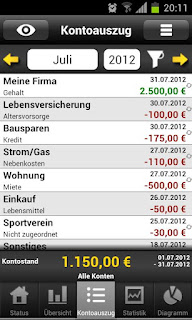
  7. Visualise the statistics as a table or graph and see where your money has gone by categorising all earnings and expenses.
  8. Filter your earnings and expenses according to months, quarters or whole years.
  9. Use the powerful search function to look for specific expenses and/or time periods.
  10. Carry your balance over into the next month. 
  11. Manage standing orders so you can plan ahead for the upcoming months.
  12. Create templates to make inputting your expenses is even easier.
  13. Add further main and sub-categories to get a better overview of your expenses
  14. Use the notepad to monitor important expenses.
  15. Protect your data by activating password protection.
  16. Export your data in HTML or CSV Format (on an SD card).
  17. Create backups so you never lose your data.
  18. Import your existing data using the CSV import function (Just move the CSV file to the folder "SDCard/My Budget Book" and import it via the app settings (Import of other formats will be made available by request).
Click here and download application, then extract app and instal:
https://hotfile.com/dl/189202511/5b09363/MBB_v2.8_(Apk_IVA).zip.zip.html 

ProCapture - Camera & Panorama v1.5.2.2


ProCapture adds advanced features to the Android camera experience. Multiple advanced shooting modes supported: Timer, Burst, Reduced Noise, WideShot and Panorama.

Features :

  1. Panorama mode automatically links together up to 12 photos to produce a high resolution panoramic image providing the ability to zoom in on small details. Output panorama has the highest resolution and best quality among competitors. 
  2. WideShot mode automatically links together 3 photos to produce a high resolution wide image. 
  3. Reduced Noise mode captures 2 photos and combines them in order to reduce noise in the photo by about 30%. 
  4. Shoot better photos with 2 different on-screen composition aids: grid and Fibonacci spiral. 
  5. Real-time on-screen histogram helps you get better exposed photos. 
  6. Simple UI with easy access to all features. 
  7. On-screen remaining photos indicator. 
  8. Ability to configure volume buttons for zoom or photo capture. 
  9. Save to internal or external storage
  10. Easily switch to external video app (does nothing in case no video app is present)
Click here and download application, then extract app and instal:
http://www.4shared.com/zip/_SGebEXg/PC_v1522__Apk_IVA_zip.html 

Scanthing OCR v1.22


Scanthing extracts text from pictures and documents and allows you to search for them by keywords on your phone using OCR (Optical Character Recognition) technology. Its the only Document Scanner you need.
Features :

  1. Capture image using our dedicated camera, your mobile’s own camera or existing image from gallery 
  2. Rotate and crop the text you want to extract. 
  3. Then extract the text using our powerful server-side OCR that runs in the background so you can carry on using your phone. 
  4. Works with all printed typefaces, but please note it will not be able to read your handwriting. 
  5. Use with Google Translate on your phone to convert from one of the 33 languages we support to another. 
  6. Fully secured HTTPS connection to our servers. We do not retain your image or extracted text after processing. 
  7. After Scan, search for your documents by just using a few keywords. 
  8. Share image or extracted text by Email, Dropbox, Evernote, Google Translate and other apps. 
  9. Add more images to existing documents, see documents by thumbnails. 
  10. Covert many documents at once in a batch, because the OCR processing is done on our servers the performance of your phone is not affected. 
  11. Associate Tags with your documents and then use Tags to find documents fast when your on the move. 
  12. Support for 33 languages, just set your default version in the settings.

Click here and download application, then extract app and instal:
http://www.4shared.com/zip/hy_CDH39/SO_v122__Apk_IVA_zip.html 

ssLauncher the Original v1.7.8


More freedom to your device!
'ssLauncher the Original' is implementing all features of ssLauncher(free version). Additionally, this includes more features, some of which will be applied to the free version with approximately monthly intervals.

Features :

  1. all of ssLauncher
  2. copy & paste of shortcuts
  3. crop icons and images
  4. additional page transition animations
  5. support folder in application drawer (planned)
Click here and download application, then extract app and instal:
http://www.4shared.com/zip/WXnDhLx4/SLO_v178__Apk_IVA_zip.html 

Tune Me v1.4


Tune Me lets you record songs with the famous "T-Pain" voice effect.
Want to sound like T-Pain? Tune Me lets you record songs with the famous voice effect used by T-Pain, Akon, and Kanye West. It uses "pitch-correction" to make you sound like your favorite rappers and singers. Never sing off tune again!
Features :
  1. Sing over any MP3 song in your phone's library
  2. Download and record over free background beats
  3. Share songs via email or text
  4. Set songs as your ringtone
  5. Freestyle mode with key selection
What's in this version :
  1. Share songs to Facebook
  2. Added a button to turn off pitch correction
  3. Long-press songs to rename them
  4. Several small bug fixes
  5. Warning is shown when recording beats without headphones
Click here and download application, then extract app and instal:
Related Posts Plugin for WordPress, Blogger...