Friday, September 7, 2012

Power Widget v3.2


With Power Widget you gain quick access to some important settings.
Power Widget offers some very nice and useful toggles.
NEW BACKGROUNDS ADDED

Info: 
  1. On some devices it might need a restart before Power Widget appears in your widget list.
  2. If you had the free version, uninstall it once you installed Power Widget.
With Power Widget you gain quick access to most of your important settings.

And most important it is highly customizable. Change
background transparency, the order of your toggles or even how much toggles you put on your toggle bar is completely up to you.
  1. USB
  2. Airplane
  3. WiFi
  4. Bluetooth (only 2.x)
  5. Silent
  6. Lock Pattern (<2.2)
  7. Brightness Toggle
  8. Brightness Slider (with auto for 2.x)
  9. Sync (only 2.x)
  10. Orientation
  11. GPS (link since 2.3)
  12. 2G/3G
  13. Stay awake
  14. Always On
  15. Screen Timeout
  16. Wifi Lock
Click here and download application, then extract app and instal:
http://www.4shared.com/zip/KX3E92Du/PW_v32__Apk_IVA_.html 

PhotoViva v2.0.4


PhotoViva is a powerful application for photo editing and freeform painting. It can help you transform your pictures into expressive and colorful works of art.

In addition to tools for enhancing your photos, there are paint brushes that let you make abstract painted interpretations of photos. You can select a brush and copy image features by cloning or painting. Brushes can track the direction of movement, or you can set the brush direction. You can also change the hue, saturation and blur of brush strokes as you go.

App Hints
  1. Use large brush strokes to fill the canvas, then use smaller brush strokes to reveal detail 
  2. Use Brushes in "Clone" mode instead of "Paint" mode to copy the source image to the canvas 
  3. Use Tools->Blend undo.. to vary the density of your most recent change to the canvas 
  4. Use the Airbrush in "Clone" mode to blend the image directly to the canvas after painting with brush strokes 
  5. Try clearing to White, Black or Cream using the Fill menu before painting 
  6. Add color noise to brush strokes to make a lively variation in the color 
  7. Use less or no color noise when painting on skin tones 
  8. Use the HDR correction feature on images that have people in the shadows
Note
  1. The maximum output image size is based on the CPU and graphics capabilities of your Android device.
Featured Functionality
  1. Zoom and pan your canvas to do detailed work 
  2. Image cropping 
  3. 10 levels of undo and redo 
  4. Camera support for devices with cameras 
  5. Gallery of sample images provided
Terrific Tools
  1. High Dynamic Range (HDR) correction 
  2. RGB adjustment 
  3. Shadows, midtones, and brightness control 
  4. Saturation and Sharpening 
  5. Autopaint mode 
  6. Hue adjustment 
  7. Add noise function 
  8. Watermarking 
  9. Blend functions 
  10. Fill to white, black or cream 
  11. Fill frame, outline or center 
  12. Fill to current color
Brilliant Brushes
  1. 20 brushes are provided 
  2. Set the angle or let the brushes track your touch 
  3. Brushes paint or clone 
  4. Brush size and color can be varied
Color Creativity
  1. Edit colors or pick colors from the canvas 
  2. An image can be used as a source of color 
  3. Adjust brightness, blur, saturation and hue on the fly 
  4. Current canvas can be used as a source of image color 
  5. Noise can be added to the color to vary the paint strokes
Click here and download application, then extract app and instal:
http://www.4shared.com/zip/uvuvfEBg/PV_v204__Apk_IVA_.html 

One More Clock Widget v1.3.5


Spruce up your homescreen with 60+ fun, expressive clock widgets!
60+ dynamic clock widgets for your homescreen, ad free.
Battery
- Time - Weather!

The
full version of OMC supports 8 widget sizes:
4x4, 4x2, 4x1, 3x3, 3x1, 2x2, 2x1 and 1x3.

Can be set to launch any app via widget click.

All widgets editable on the phone and via JSON.
Tested to work with WidgetLocker.


Click here and download application, then extract app and instal:
http://www.4shared.com/zip/BRPYvZsA/OMCW_v135__Apk_IVA_.html 

mTorrent v1.37


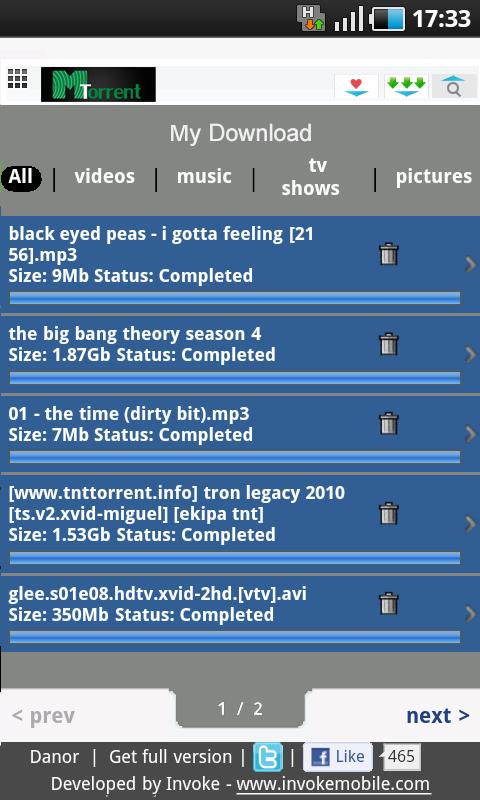
MTorrent -Download videos, music, Tv shows & pictures on your mobile phone and watch them where ever you go; also watch all the movies you want on live streaming! get all the torrent you want fast with cache.

Features :
  1. Search for torrents on the web and mobile.
  2. Download torrents such as videos, movies, music, pictures etc. download all known formats such as avi mkv wmv mp4 3gp mp3 jpg gif etc.
  3. Force start any torrent to enable fast download.
  4. Streaming of cache torrents such as movies and music -MTorrent is the only mobile torrent application in the world today that lets you watch from cache. You are able to watch and get other people torrents such as videos and music and pictures in a few seconds and you do not need to wait until the torrent downloads, you can watch it immediately!
  5. Watch all the movies from cache on live streaming! 
  6. The ability to download torrent even when the application is closed – after you download a torrent which is new and not from cache you can close your phone and it will keep downloading even if the application is closed After awhile you can reopen the application and check the status of the download to see if it is completed 
Click here and download application, then extract app and instal:


Mosaicture - Photo Mosaic v1.7


Mosaicture is the first Android application that generates mosaics based on all available images on your device. While other applications simply draw the original image over top of your photos, Mosaicture uses the available images on your gallery, automatically placing them in the correct place to recreate the original image as a mosaic.

Select an image of your device, or take a
picture, and give it a time so Mosaicture can recreate the original image using the images on your gallery. The more different the color of your images, the more precise Mosaicture can match the original image.

Features: 


  1. Create mosaics of any photos on your gallery 
  2. Use zoom-in to visualize the photos used on your mosaic 
  3. Adjust the size of your mosaic 
  4. Select photos that should not be used on mosaic generation 
  5. Share your mosaics via email, facebook, twitter and more
Click here and download application, then extract app and instal:
https://hotfile.com/dl/189201202/57e02fc/MPM_v1.7_(Apk_IVA).zip.html 

Related Posts Plugin for WordPress, Blogger...