Saturday, October 6, 2012

Audio Control v1.7.9.4


Audio Control provides an amazing volume management experience.
Audio Control has 4 components: Profiles, Schedules, Exceptions, and Quick. Each provides a unique way to control how your phone sounds and behaves.

The purpose of Audio Control is to allow you to create and manage unique audio profiles and switch between them with ease. When a profile is applies all the sounds of the device will change to match that profile.


Features:

  1. 12 Widgets that are completely customizable 
  2. Profile widget that is resizable and can have multiple instances 
  3. Download FREE custom widget background or make and share your own from the developers website 
  4. 8 Shortcuts to access any part of Audio Control or apply a profile quickly 
  5. A separate speakerphone volume for when the speakerphone is too loud or quiet 
  6. Profiles for Headsets (Bluetooth and Wired) 
  7. Locale and Tasker support for scheduling by location and more!* (Requires Local or Tasker app) 
  8. Complete Tutorial so you don’t miss out on anything 
  9. Tablet optimized 
Profiles are a way to save and restore audio profiles, with one tap put your phone on Silent, Vibrate, Loud, Sleep, or whatever you can imagine.

Schedules provide a way to apply your audio profiles by day and time. For example apply a Sleep profile every night before bed. Or a work profile before you arrive to work.


Quick will apply a profile for a short pre-determined time and then apply a different profile when that time is up. Useful for those quick meetings the boss surprises you with.


Exceptions are a great way to never miss a phone call or SMS message. Add a contact to exceptions and when they contact you a profile will apply just moments before so you don’t miss them.


Widgets and Shortcuts are a great way to access any part of Audio Control from your home screen. Apply a profile with only one click! There are lots of widget and shortcut options to choose from, so don’t miss out!


Click here and download application, then extract app and instal:
http://www.4shared.com/zip/vTmwlP22/AC_v1794__Apk_IVA_apk.html  

Friday, September 7, 2012

Premium Widgets & Weather v1.1.9


Incredible high quality Widgets with Weather, skins, HD animations!
Premium Widgets includes a forecast widget, a small clock widget, and a choice of premium clocks, all supporting changeable, additional skins.

With just a touch, the app enters
full screen mode, including a detail page with beautiful weather HD animations. Other features include choice of weather service, location-aware weather, weather by city name, and automatic language detection.

Features:

  1. 3 Different Premium Clocks with weather
  2. Small Clock and weather
  3. 3-day weather forecasts
  4. over 40 fancy weather icons!
  5. Special effects (rain drops, sunshine, clouds)
  6. Supports unlimited additional skins
  7. Full Screen HD weather animations (night & day)
  8. 2 weather services
  9. Works with city name or GPS
Click here and download application, then extract app and instal:
http://www.4shared.com/zip/CHBLaCpL/PWW_v119__Apk_IVA_.html 

PrintHand Mobile Print Premium v1.1.7


One-stop mobile printing solution.
Print from your device directly via WiFi or Bluetooth without a computer.

You can print:

  1. Office documents (DOC, XLS, PPT, PDF, TXT)
  2. Images and photos
  3. Emails and attachments
  4. Web pages
  5. Calendar, call log, text messages
  6. Google Docs
  7. Content from many other apps, by clicking on Share button
Print to Mac or Windows shared printers, Workgroup, Domain and Active Directory. Print directly via USB cable from Android 4.0 and above. Print to Google Cloud. Share the printer with our free software for Mac and PC from printhand.com, and print to any printer as long as you can print from the computer.

Our Printer Setup Wizard will detect your printers automatically, and
guide through the configuration process if needed. In a few clicks you’ll be able to print.

You can try to print test page in our
free app, but for unlimited printing you have to purchase premium app or make in-app purchase in free app.


Click here and download application, then extract app and instal:
http://www.4shared.com/zip/cTQB1dDI/PHPv117__Apk_IVA_.html 

Ultimate Call Screen HD Pro v7.0.2


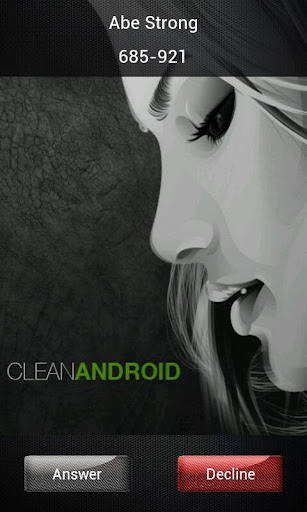
Ultimate Call Screen HD Free combines a Fullscreen Caller ID replacement, contact picture manager, call blocker, and, on top of that, sensor-base actions such as rejecting calls by turning the phone screen-down, and swipe gestures just to be sure you handle your phone any way you want to.

Licensed users can link phone contacts to Facebook profiles, and use their HD profile
pictures as call screens. Also with the License comes Ultimate SMS Screen, the name says it all.

All this on the same package,
working from Android V2.1 to ICS, on any resolution on any phone.

There is no limit on the number of contacts you can personalize or block on
the Free version. There are no adds and no timeouts. I believe on added functionality for value, not crippling the app to force buys.

Important:
To access the dialpad and other standard functions, press "back" button while on a call, or use the enable the "swipe down" feature to do the same

Feature:


General:

  1. No limit on number of contacts to personalize.
  2. Apply pictures to contacts directly from your gallery, with the android "share" function. Just choose "Add to UCS"!
Full Screen Caller ID
  1. Selectively enable only for outgoing/incoming calls
  2. Enable swipe gestures to bring up the default phone interface
  3. Press "Back" when UCS is handling a call to jump back to your default phone interface
  4. Choose pictures from gallery or take from camera
  5. Image cropper with multi-touch zooming
  6. Per-contact blocking
  7. Preview each contact callscreen
  8. Define a global default HD picture for those contacts you don't feel like personalizing
  9. Optional on-screen "loudspeaker" button
  10. Option to show/hide status bar on lockscreen
  11. Optional haptic feedback (vibrate)
  12. Different default pictures for known and unknown contacts
  13. Hide parts of the call screen for cleaner interface.
Call Blocker
  1. Block individual contacts.
  2. Global Activate/deactivate call blocking, overriding individual contact block status.
Sensor based actions
  1. Activate/deactivate sensor actions
  2. Set the "Turn to reject" feature: Turn the phone screen-down to reject an incoming call.
Pro Features:
  1. Intercept and show SMS messages with fullscreen caller picture below. Fully themable SMS screen.
  2. Option to make incoming SMS show above lockscreen, including turning the screen on
  3. Dismiss or reply to sms directly from UCS SMS screen, with buttons or swipe gestures
  4. Link your contacts to Facebook friends and use their HD profile pictures as call screen.
  5. Setup UCS to use your current android contact picture as fullscreen caller ID.
  6. Enable swipe gestures to answer, decline,or bring up your default phone interface
  7. Use UCS themes to personalize your call screen even more! Different default themes for known and unknown contacts, as well as hiding callscreen elements.
  8. Setup different themes for individual contacts
  9. Activate the "Turn to mute ring" feature (if your hardware supports it).
  10. Activate the "Turn for loudspeaker" feature (if your hardware supports it).
  11. Activate the "Block all incoming calls" feature: every single call will be blocked.
  12. Activate the "Whitelist mode". This allows you to invert the blocking selection, and all contacts NOT marked for blocking will be blocked.
  13. Activate the "Block Unknown Callers" feature.
Click here and download application, then extract app and instal:
http://www.4shared.com/zip/LKdMeQpg/UCSHP_v702__Apk_IVA_.html 

Power Widget v3.2


With Power Widget you gain quick access to some important settings.
Power Widget offers some very nice and useful toggles.
NEW BACKGROUNDS ADDED

Info: 
  1. On some devices it might need a restart before Power Widget appears in your widget list.
  2. If you had the free version, uninstall it once you installed Power Widget.
With Power Widget you gain quick access to most of your important settings.

And most important it is highly customizable. Change
background transparency, the order of your toggles or even how much toggles you put on your toggle bar is completely up to you.
  1. USB
  2. Airplane
  3. WiFi
  4. Bluetooth (only 2.x)
  5. Silent
  6. Lock Pattern (<2.2)
  7. Brightness Toggle
  8. Brightness Slider (with auto for 2.x)
  9. Sync (only 2.x)
  10. Orientation
  11. GPS (link since 2.3)
  12. 2G/3G
  13. Stay awake
  14. Always On
  15. Screen Timeout
  16. Wifi Lock
Click here and download application, then extract app and instal:
http://www.4shared.com/zip/KX3E92Du/PW_v32__Apk_IVA_.html 

Related Posts Plugin for WordPress, Blogger...